
University students
- Track internships, placements and graduate schemes.
- Keep deadlines visible alongside your studies.
- Turn projects and part-time work into application evidence.
For students, graduates & early careers
GradPlan brings your job applications, CVs, deadlines and interview preparation into one workspace. Track each role, tailor your documents to the opportunity and build on what you learn — so your next application starts with more context.
30 days · One payment · No automatic renewal
Invitation required. Free to join the waitlist.
Sound familiar?
The work around an application adds up quickly. When updates, documents and preparation are scattered, even knowing what to do next takes effort.
An employer has replied. What changes next?
A deadline to remember. Is the status up to date?
Another CV version. Which one did you send?
An interview next Tuesday. Where are your notes?
Keep the role, application history, documents and preparation linked. See what needs attention and pick up where you left off.
Keep role details, deadlines and application stages in one record.
Review and tailor your CV with the job requirements alongside it.
Build interview examples and practise assessments with your next stage in mind.
Capture reflections and useful evidence to shape what you do next.
A look inside
Scroll to explore the pages, or choose a tab.
01 / Application Tracker
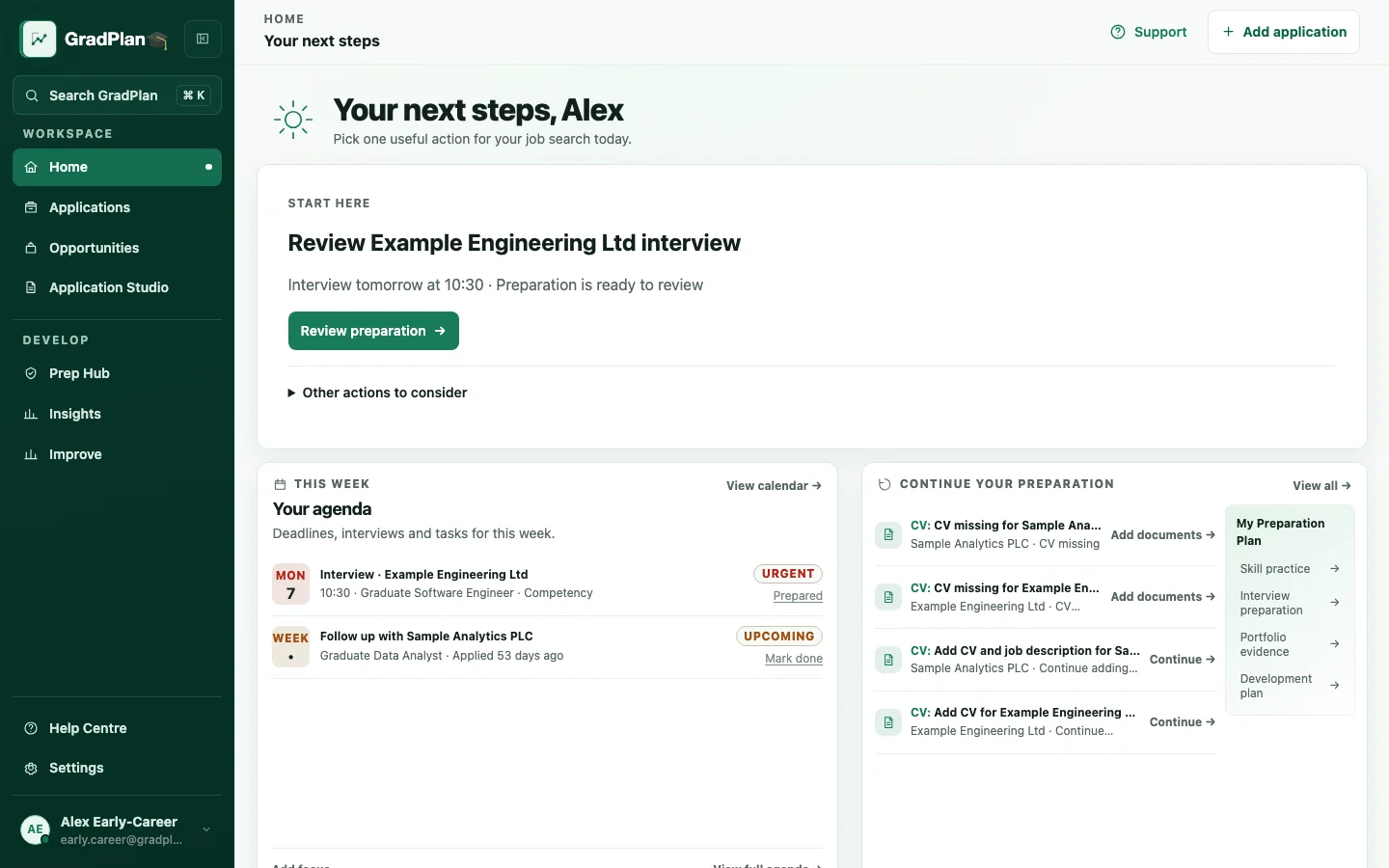
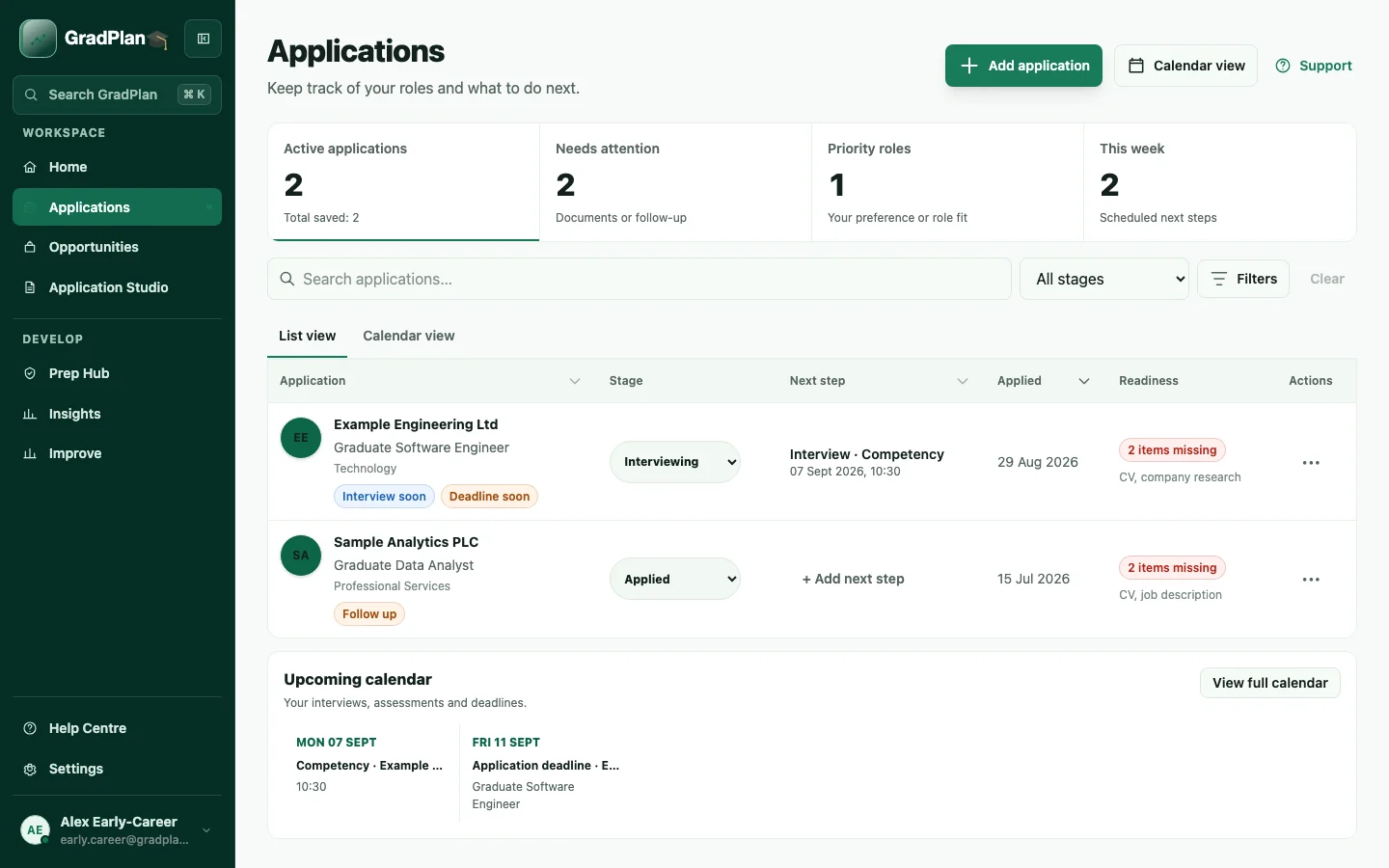
Keep role details, deadlines and application stages in one view. Know what needs attention and record the next action for each opportunity.
02 / Application Studio
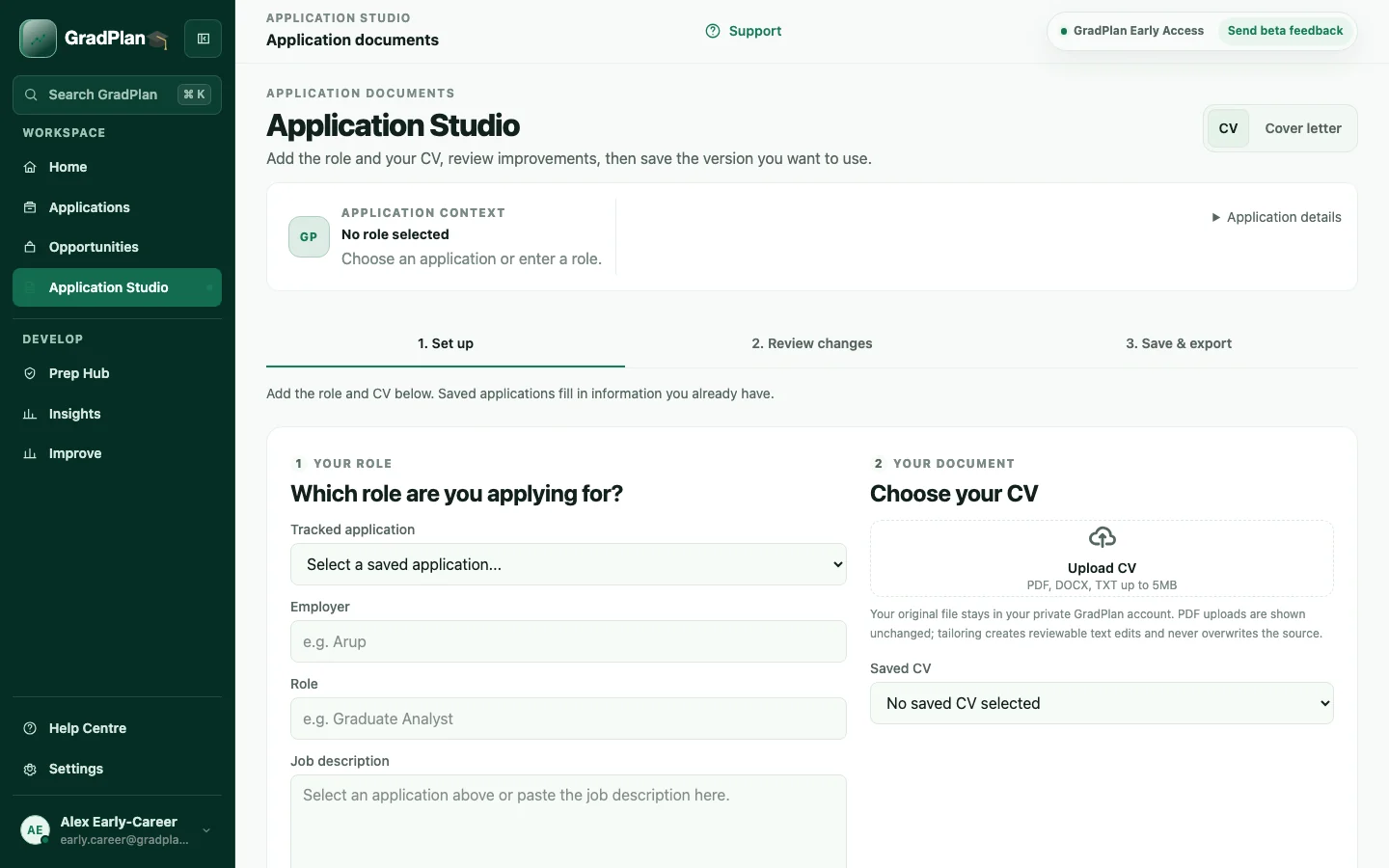
Keep the role and CV side by side, review suggested improvements and decide what to accept. Your final document stays in your control.
03 / Preparation Hub
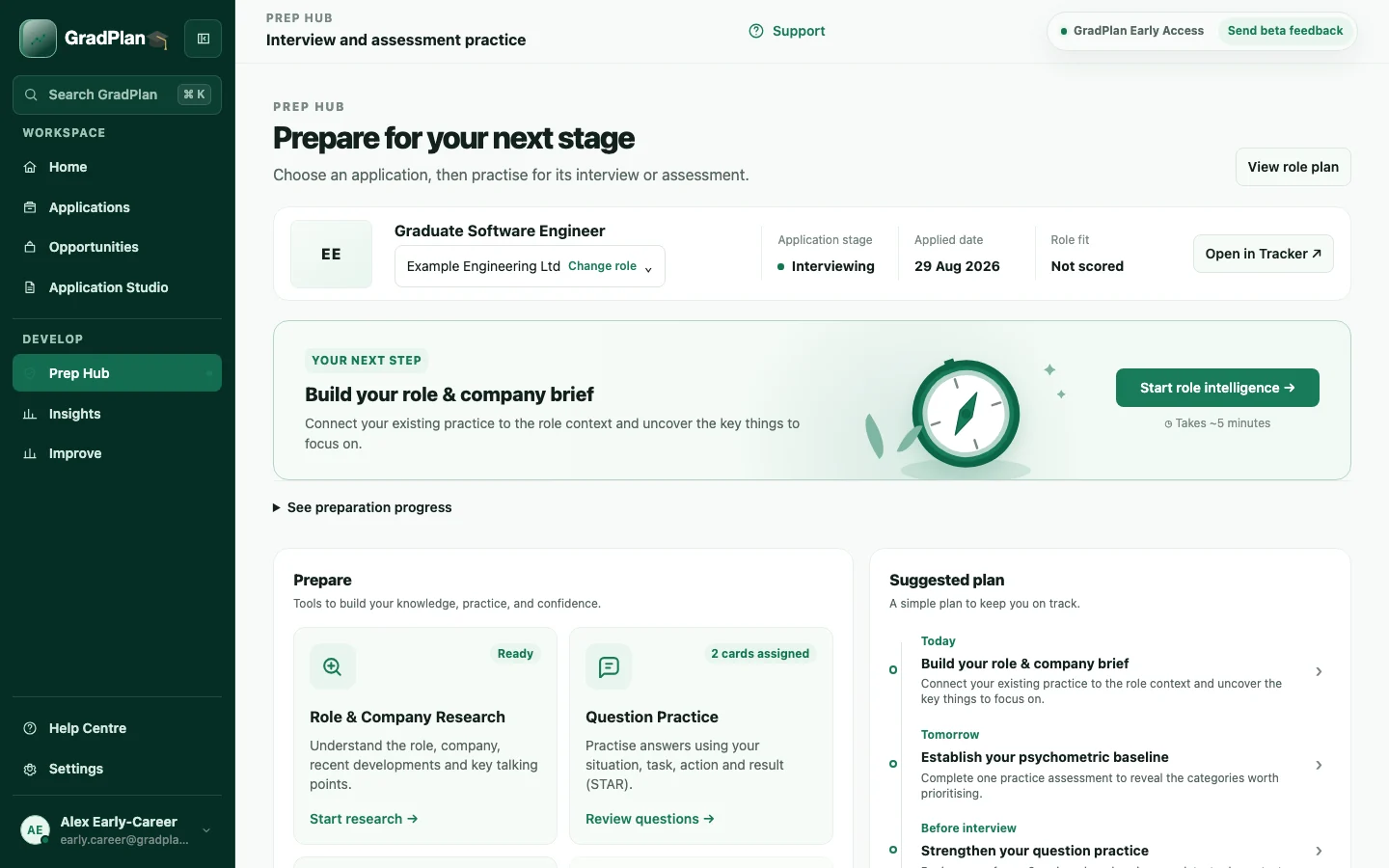
Bring company research, interview examples and assessment practice together. Prepare with the role and your own experience in view.
04 / Insights
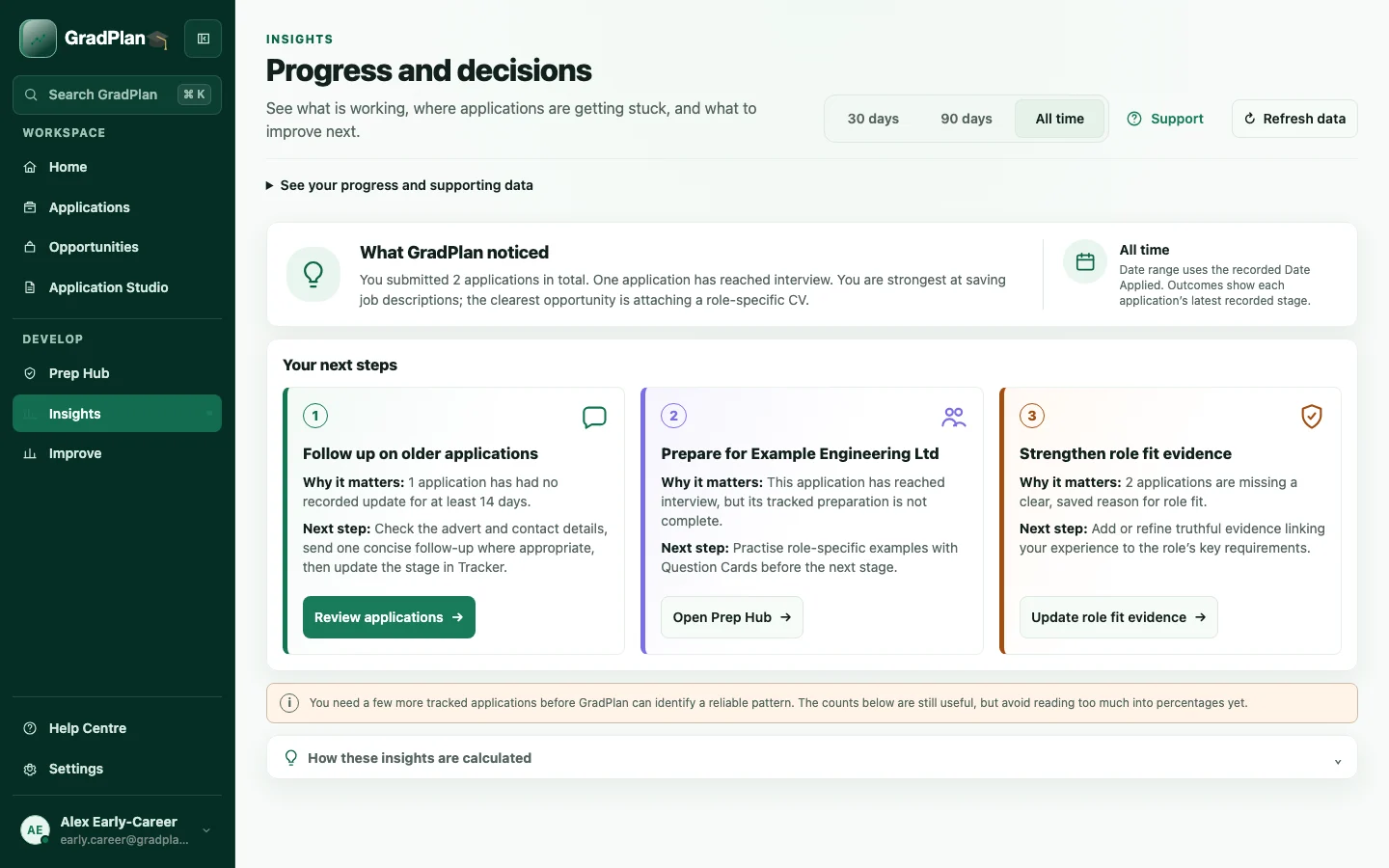
See how your applications are progressing and capture reflections after each stage. Use what you learn to plan your next step.
Keep role details, deadlines and application stages in one view. Know what needs attention and record the next action for each opportunity.
Keep the role and CV side by side, review suggested improvements and decide what to accept. Your final document stays in your control.
Bring company research, interview examples and assessment practice together. Prepare with the role and your own experience in view.
See how your applications are progressing and capture reflections after each stage. Use what you learn to plan your next step.
Try a task or explore the sidebar. Changes stay in this demo. Open full screen ↗
There’s more than one starting point
For UK students, graduates and early-career professionals aged 18 or over.
Your search, with more context
Separate tools leave you to connect the dots. GradPlan brings tracking, document work, preparation and reflection around the same application — so each stage has a clearer starting point.
| Your next step | With separate tools | With GradPlan |
|---|---|---|
| Keeping track | A status in one place. Deadlines, employer updates and the next action still need piecing together. | The whole application in view. Keep the role, stage, key dates and next action connected. |
| Tailoring your CV | A document to work on. You switch back to the job advert to check what matters for this role. | The role beside your CV. Review your document against the opportunity and choose which suggested changes to keep. |
| Preparing for interviews | Notes across different tabs. Research, examples and application details take time to pull together again. | A more useful starting point. Bring your application context, experience and preparation into the same workspace. |
| Learning from outcomes | Useful details get left behind. Feedback and reflections are easy to lose when you move on to the next role. | Something to carry forward. Record what happened, review your progress and decide what to work on next. |
AI assistance, your judgement
Suggestions support your thinking.
Choose what to accept, edit or reject.
You send your own applications.
The 30-day beta
Application tracking, document tools, interview and assessment preparation, and reflections.
AI and practice limits apply. What’s included?
£4.99 for 30 days
One payment · No subscription
No automatic renewal
Free to join. Pay only if invited and you choose to continue.
Your next step
Email, then your current stage.
Add interests if you’d like.
Already invited? Sign in to continue.
A little clarity is on its way
We’ll email about your invitation. You’ll see the access terms before choosing whether to pay.
Already joined before? You’re all set. To change existing preferences, contact hello@gradplan.uk.
Your questions, answered
Using GradPlan, beta access and your data. Need a hand? Contact us.
UK university students, recent graduates and early-career professionals aged 18 or over.
GradPlan is a connected workspace for your job search. Track applications and deadlines, work on CVs with the role alongside them, prepare for interviews and assessments, and reflect on what you learn along the way.
GradPlan pairs application tracking with document work, preparation and reflections. You can keep working on the same opportunity instead of moving between separate trackers, files and notes.
Yes. Open the live demo to explore a sample workspace with fictional data. You can try the controls without an account; demo changes stay in that demo and do not create a real application.
Yes. Add an existing application and its current stage, then build up its role details, documents and preparation as you go. You do not need to start your whole search again.
No. Choose your current stage when you join the waitlist. Career interests are optional, so you can leave them blank while you explore your options.
Application tracking, CV and document tools, interview and assessment preparation, progress insights and reflections. AI and practice tools have usage limits, shown in your account. Some features may change or be unavailable during beta.
Joining the waitlist is free. It does not create an account or guarantee an invitation date. If invited, you can sign in and choose the £4.99 pass. Your 30 days start when payment succeeds.
Paid beta access ends. There is no subscription or automatic renewal. Any further access or pricing will be explained before you choose to pay again.
Some document and preparation tools use AI. Review suggestions before using them; they can be wrong. You decide what to keep and submit applications yourself. GradPlan cannot guarantee interviews or offers.
Waitlist details help us manage invitations and plan onboarding. Product emails are optional. Waitlist interests are not sent to AI providers. See our Privacy Notice for AI processing, retention and deletion details.
Use our contact page or email hello@gradplan.uk. Include what you were trying to do and what happened so we can understand your question or feedback.